Website Development Strategy That Will Drive Customers

What should be the first step in developing a website?
1. Creating a design to use as a basis,
2. Deciding how the content needs to be integrated and managed,
3. Gathering content from corporate collateral,
4. Developing a strategic plan for your specific needs, or
5. Choose the most cost-effective hosting plan.

In just about any profession other than website development, your answer would be choice 4. After all, you couldn't build a house without considering the layout, number of bathrooms, and features of the home. You wouldn't create a design for a major advertisement and then plan the content and message of the ad. Yet, when it comes to website design, often the design comes first and the strategic plan for the site comes last.
Being a veteran of about 20 years in marketing and design, this issue has perplexed me for years. It seems to me that the development process should be:
1. Discover the reason a business needs a website and the expectations of the business.
2. Understand your typical customer and what influences their purchasing decision.
3. Have a clear understanding of how the website fits into the marketing plan.
4. Research to find what customers are searching for in Google, Yahoo in relation to the business (keywords).
5. Carefully plan a site architecture which is best for the demographic, online search trends, and have a site that's easy for search engines to follow, is designed with the target market in mind, and has clear definitions of conversion goals.
6. Create a design which speaks to the target demographic.
7. Launch the site and begin an internet marketing plan to fulfill realistic expectations.
8. Modify strategic marketing plan as needed in response to real-time data.
Then issues such as server configuration, hosting service, domain registration variables, proper site construction, CMS, SEM, PPC, Social Media, and many other features need to be researched and fine-tuned. For example, choosing a hosting package with an IP that has been associated with a "bad neighborhood" in the past (bad neighborhoods are offensive sites, etc.) can cripple your website marketing plan before it begins.

Instead the plan is usually:
1. Create a design.
2. Add content. (most plans end at this point because there usually are no marketing goals for a site.)
3. Contact SEO firm who performs keyword research based on content of site.
4. SEO firm proposes keywords.
5. Site is optimized by SEO firm by editing original site to make it more SEO friendly.
6. Results vary.
7. Usually followed by redevelopment IF business doesn't lose faith in the internet.
All the details are usually not dealt with because the average designer doesn't know they exist.
I think the reason the internet world can get away with a backwards strategy is because the design portion is fun, is more tangible, and looks impressive. It gives a client the ability to suggest colors, logo position, interactive media, position of the navigation system and other elements. The process usually goes smooth because the developer gets the excitement from the client and the client is impressed by the nice design work. BUT... that's also why over 99% of all internet businesses FAIL.
Because there is no quality infrastructure and strategic plan in place. Either the site is poorly marketed, keywords are unfocused, or it doesn't fit into the overall business marketing plan. In most cases, this is where the business owner begins to think the internet is all hype and will not work for their particular business. They disregard stunning statistics, such at 65% of all Americans begin their search for local services on the internet FIRST. This is followed by a competitor leveraging the internet as a strategic advantage and ultimately leads to a loss of revenue by the disillusioned company. So What's the CURE?
Your website needs to be planned. A thorough understanding of your expectations, target demographic, and geographic influences have to be considered. The proper research needs to be done to assure your internet marketing plan has the right infrastructure and architecture and then you can eat the "cake" (design).

BUT...
This is easier said than done for the following reasons:
* It's more expensive to create the right plan.
* It's not as fun to start off with planning, expectations, and realistic goals.
* A good team to create your plan has to understand design, marketing, social media, SEO/SEM, custom development, and customer service to get the job done.
* Most website developers mask their weaknesses. Some are good at design, others technical work, others SEO, but few are good at it all...
* College students and novices practically give away website design which is hard for the business to turn down.
* Consultants usually do not have a complete understanding of the entire process.

AND THE WORSE PART...
Is now the internet developing world has realized that cheaper, do-it-yourself systems sell better than a comprehensive plan. (See our article on "canned solutions.") So companies like Intuit provide "simple solutions" (because it is high profít, low overhead), and the one who ends up suffering is your business. Be Smart and Eat Your Vegetables First... Then have Dessert.
Proper planning is the cure. Hiring an experienced company to help you is the one way you will truly have an opportuníty to dominate your market online. It will cost a little more, it won't be as fun up front, but it will be worth it in the end.

About The Author
John Carroll is A.C.E. and SEMPO certified and has almost 20 years experience in marketing and design. His internet marketing plans have helped many organizations reach new levels of success using both the internet and traditional marketing techniques. John Carroll is founder of www.MaxWebGear.com.

Google Instant Previews - Implications for SEO & Marketing

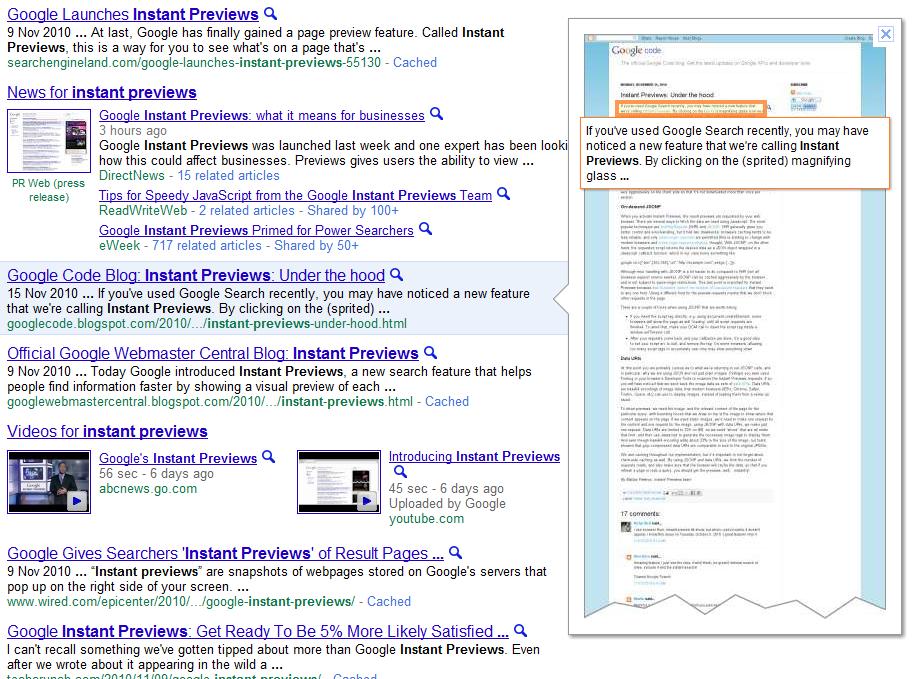
Google wasn't satisfied with just having Instant Search, now it has introduced something called Instant Previews. Searchers and web users can now browse a large instant "preview" of a site's content by placing the cursor over the small magnifying glass displayed beside each listing. These previews are large and Google sometimes highlights a major paragraph or quote from each displayed site.
Searchers can get a general look at the layout and design of a site, onpage graphics and bold headlines can usually be seen from the preview. However, small print and the general content of the page can't be read, so searchers will have to click through to your site if they want to read your information. Assuming of course, they don't find what they're looking for in the headlines or bold print.


Whether searchers will use this new feature remains to be seen, but these instant previews could have some ramifications on who gets the "click through" to their site. One would also reason that getting the top spot in the rankings have diminished somewhat, if searchers can quickly preview all of the top 10 listings and then make their decision. So they might not click the top listing, but decide one lower down is worth clicking. This could make any listing on the first page more worth having, not just the top one.


Google Instant Previews Screenshot

This doesn't really affect any of your SEO strategies and you should be optimizing for the search engines as usual. After all, getting those top rankings for your targeted keywords in the major search engines is what brings in the quality traffic to your site. In this regard, it's business as usual.
However, Google's Instant Previews does change the whole nature of SERPs or rather Google's search results in that webmasters and marketers have another hurdle to get past before they get that final click. Searchers might click your top number one ranking preview and decide your page is not up to standard or it's not what they're looking for, and can quickly try out the other listings instead.

From Google's perspective these previews could improve the "overall" quality of their results because searchers will come away happy, especially if they have not wasted their time clicking on a link, only to find it's not what they're looking for. Now they can easily find the right results more quickly and efficiently.
For the webmaster or online marketer, these new Instant Previews can be seen as another chance to get that all important click. They must make sure their page design is up to scratch and featuring a catchy headline which draws visitors to their page or site. Also, highlighting a well worded summary could help attract more of these visitors. So too, would placing your main keyword phrase in bold print so that it can be read from the preview.
Needless to say, webmasters/marketers must always keep their targeted keywords front and center. Highlighting them on your page in the main title is already a given, but now you should make sure they can be read from the preview. This could possibly give you an edge with it comes to getting that click from Google.

On a more general note, these previews also add to the time searchers will spend on Google's results pages. Google has been steadily focusing on this factor in recent months. Why? One good reason - the longer a searcher stays on your page the more likely they are to click your paid ads. Stands to reason, if the searcher can't find what they're looking for in the so-called "free organic listings" (actually, truth be told, for very lucrative keyword phrases these are not free, nor organic) they will look to the paid Adwords listings.
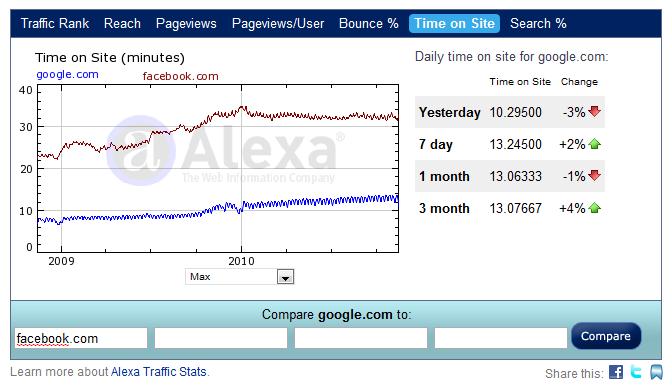
If you check out the average time spent on Google, according to Alexa, in 2009 it was around 7 minutes and now in 2010 that average has jumped to around 14 minutes. And that's before both Google Instant Search and Google Instant Previews are fully rolled out and implemented. One would expect that number to go much higher. While this is nowhere near Facebook's average time of 31 minutes, Google has still doubled the time it had only a year ago. No wonder, Google can afford to give their employees that 10% raise, they have probably earned it.

Daily Time On Site - Google/Facebook

Nor should Google be criticized for doing all of this, they are a business and their goal is to bring in more revenue. Besides, these previews will no doubt improve the effectiveness of Google's SERPs. Searchers can more quickly find what they're searching for on Google and come away happy. A satisfied customer is the ultimate goal of any business, why should Google be judged any differently.
However, for the webmaster and online marketer, keeping Instant Previews in mind when creating webpages is a must. Here are some suggestions you can follow:
1. Improve Your Graphics - These can really grab the searcher's attention in the preview so it's vital to have eye-popping graphics right next to your important information.
2. Create Great Headlines - Good headlines quickly capture the searcher's attention and draws him/her to your page; just make them bold enough to be seen in Google's previews.
3. Write An Informative Summary - Place your important information in a short summary which also captures the viewer's attention. Entice these viewers to visit your site or page.
4. Take A Multi-Layered Approach - Just don't aim all your marketing towards free organic search, but try video listings, news listings, image listings... to get other ways onto Google's first page.
5. Finally, PPC Advertising - This is probably not what you want to hear, but paid listings through Google Adwords is another option. Besides, for extremely lucrative keywords, as more and more major companies throw major funds into SEO and Keyword Link Buying, organic search is not really free or even available to everybody anymore. For the small-time webmaster or marketer, paid listings in Google may be your only option and that option is quickly becoming too costly for many.
Of course, how Instant Search and Instant Previews play out in the near future is still open to wide speculation. Will searchers even use those added features in their daily searches? Or will users opt–out and go back to a more gentle, less hurried Google? One thing that all of us can be sure of, Google will be constantly rolling out new features and innovations just to make all our lives a little more interesting.

About The Author
Opinions expressed are solely those of the author, a full time search engine marketer who operates numerous niche sites, as well as two sites on Internet Marketing: www.marketingtoolguide.com and www.bizwaremagic.com Titus Hoskins Copyright 2010.

Web Marketing Ideas And Tips – 3 Blunders Every Internet Marketer Should Avoid

Top 3 Web Marketing Ideas and Tips
It is every web marketer’s dream to enjoying huge web presence; not everyone achieve that. Did you know the common mistakes that contribute to the failure of achieving this motive?

The foremost blunder that many web marketers commit is making a web site that loads very slow. Asking the traffic to wait for loading is suicidal to say the least because visitors psychology is to skip and hop from one site to the other and if in this process your site doesn’t load in time it’s like you have lost the visitor to your competitor. A fast site that is user friendly and free of too many graphic elements is what you can expect a traffic response.

Another blunder is sending excess promotional material. Blowing one’s own trumpet. How long can it be received? Your respect is lost to gutters if you promote abvout your success in excess.

The last mistake is to stop taking email addresses of every visitor. Instead if you aspire to achieve success build targeted email list, as this is your real business clientele. Offer something worthwhile for the visitors they will likely become your subscribers and you can convert subscribers to customers over course of time. However, for this ensure good content and have opt-in box for the visitors to willingly subscribe for your ezine or newsletter or blog updates.

Press Release Writing and SEO Manual Submission Could Boost Your Site SEO

How is Press release writing different from article writing?

It's only in respect to the format of writing, otherwise all is quite similar. A well-crafted press_release captures the attention of the media instantly and the information is spread faster than you would have ever imagined. Some useful tips to write a strong press release

Formats of a press release: It includes date instruction that implies whether the release of the product or service is immediate or on a subsequent date, contact information of your identity so that media can get connected to you, headline that will have crisp but important details of the product or services in few lines, besides being catchy to hold on to the reader's attention. The headline is written in such a way that it enthuse readers to continue reading the article. Then a summary of the information is written in a line or two. Then comes the body of the press_release and in it use simple words to state the facts and benefits. No verbose language is needed. Bulleted points benefit readers to take an informed decision. End the press release by writing a line or two about the company.

Newsworthiness of the content: Ensure that the content of the press-release is newsworthy. Not everything becomes news so wait for adequate substance to issue news. Never write a PR to sell products or services. Writing a promotion article as a press_release is never acceptable. A press-release should answer all Ws (Who, What, Where, When and Why). Grabbing the attention of the readers should be the prime objective so make it enjoyable reading.

Content is the king: The press-release is considered well written when besides the right format; the information is given precisely without playing with words. Write the content in a way that is easy-to-read and is accurate. Then if you want to, add keywords judiciously relevantly without having to make it read spammy. For instance if you are writing a press_release about launch of SEO manual directory submission, then use a keyword tool that gives you keywords such as directory submission, manual submission, manual directory submission, SEO manual submission, etc and you could use the same in the content at optimum density.

Quotes should be with permission: Permission should always be taken to put a copyrighted quote in a press release and the source must be mentioned.

Include images: A PR reads more attractive if some images are included. Plain text is not that eye catching to grab reader's attention. It can be a unique way to brand your company.

Proofread the PR: Before submitting press_release, it must be checked thoroughly for grammatical errors, spelling mistakes, Re- read the press release at least two times in different time to identify mistakes. In no way should the press release read like an advertisement.

Right way of doing press_release writing and then SEO manual directory submission of the same could actually surprise you by boosting your site's SERP.

Manual seo submission is providing press release writing and submission services with guarantee of result or money back. You can also choose our services for article writing and submission services. To know more please check http://www.manualseosubmission.com.


Article Resource : http://ezinearticles.com/?Press-Release-Writing-and-SEO-Manual-Submission-Could-Boost-Your-Site-SEO&id=3753884

You Can Rank Great Should You Comply With Article Writing and Submission Guidelines

Your online business might not be performing well in terms of generating ample traffic and thus your business is suffering a set back. But the latest method of writing articles that are optimised with keywords about your product or business and publishing them on different sites can fetch you great traffic and your business will see a new transformation. The article submission method can be a powerful strategy to increase your search engine rankings. It also helps in establishing a brand, getting you the targeted visitors and increase sales and turnover of your business.

Manual submissions of articles is the way to go

Manual directory submission is the fastest and easiest way to promote your articles, which help you get higher rankings on the various search engines. SEO manual submission and you article directory submission helps you get quality back links and one-way incoming links to your website. Article submission is an ideal way for your website to get recognised on the search engines of Google, Yahoo, MSN and other popular search engines. But for best results you need to follow certain rules of manual submission to achieve quality traffic to your site.

Maintain sufficient keyword density

Keywords are an important aspect of successful manual directory submission, which gets you on the top ranking in the search engines. So use relevant keywords in the article but don't give too much attention to only keyword spamming. Optimal keyword density can boost your website popularity.

Avoid SPAM technique

It just does not work if your website has a good design, your website need to contain meaningful content that is basically reader-friendly. Manual submission of article is an art in itself and you need to master over various aspects of successful manual submission and one such aspect is to avoid writing explicitly on the website or use it as promotional tool. Remember you are merely informing the reader and there should not be any doubts regarding this.

Avoid jargons and flowery words

The SEO manual submission and your article directory submission will be truly successful if the article is jargon free; for you need to understand that for most of the readers English is not a foremost language and for all these majority of readers, simple language without frills and fancies will do the trick. It avoids unnecessary complications and the article becomes more reader-friendly. Establish a rapport with the reader and a personal touch in the language will motivate the reader to read the entire content of the website.

Concentrate on grammar

Quality articles always come with a special feature; they are grammatically impeccable. One should always follow the rules of grammar and punctuations so that the article comes out error free, which will gain you more readers or better traffic.

Stay on topic

And never ever move out of the topic you are writing on, stick to the topic that indicates a professional approach which will gain more readers to the article and traffic to your site.

These are a few secrets for a successful article writing and manual submission.

RS Complete Seo Services Solution provides article writing and submission services with guarantee of quality and eye catchy contents according to keywords. To know more about our company and services please check http://www.seomanualsubmission.com


Article Source : Seo Manual Submission

How to Exchange Links

You may already be aware that link popularity is probably the most important factor to getting a number one rankings on the search engines. However there is something that most people forget when trying to do link exchange:
It's not just the quantity, but the quality of the links that is important!
Basically, "link farms" (or "free-for-all pages"), created only for the purpose of automatic link exchange, and where there are thousands of unrelated links, do not work any more. If you do link exchange with a link farm, your site can be severely penalized, especially with Google.
So, you need to find good quality sites, how do you do it? Well, there are two different ways.
1. Search for link partners in specialized directories that focus on link exchange. The Link Exchange Directory is one example. Other link exchange directories can be found here.
2. Purchase one-way links from a directory that organizes sales of links, such as LinkMarket.
3. Good quality sites are going to have high search engine rankings. So, what you can do is simply to search for the top 100 ranking sites on Google, or other search engines, for the keyword that you are interested in. For example, if your site sells wine, then you search for "buy wine" and "wine" or "wines" and find the top 100 sites for each of these keywords.
How to convince the webmasters to do link exchange with you? There are two ways you can do this:
1. Ask for a link exchange.
Since every webmaster is eager to get links pointing to his website, most webmasters will answer favorably to your request. However, you should write personalized email messages, and include in the email the main reasons that the other webmaster should exchange links specifically with your website. Tell the other webmaster that you have put a link to their site (show them the page where you have put a link). Then tell the webmaster that it will benefit their visitors to have a link to your website. Lastly, give an example of exactly where you suggest the link should be on their site, and an example of the wording that they could use. Link exchange html code might help even more! This makes it really easy for them to link to you.
2. Offer an incentive for the link exchange
If your product has an affiliate program, then you simply suggest that they promote your affiliate program on their site, and they will be able to get a commission for each sale for people coming from their site. Alternatively you can advertise on their site and pay a fixed fee.
Another type of incentive is to offer your product for free, or offer free advertising for their site on your site. There are several alternative ways to do this.
Here are some other important things you should think about:

  1. Try faxing or phoning Website owners. Faxes receive a lot more attention than emails.
  2. Make sure that your email (or fax) is individualized, and states the benefits for their site and their visitors.
  3. Make sure that your site has good quality content that people are going to want to link to.
  4. Make the email (or fax) personal. Use the webmaster's name if you can find it.
  5. If the webmaster doesn't respond to your first email, try emailing again a week later as a gentle reminder.
  6. Suggest anchor text for the link back to your site that contains the keywords that you want to rank highly for.
  7. Use a database to keep track of who you have emailed and their responses.
  8. Create a template email that you can use to save time BUT don't send the same email to everyone. Individualize!
  9. If you are sending out lots of emails you can use an emailing program to individualize each email.

Doing all of this by hand can be very tedious, so I recommend using an automated script such as Link Exchange Machine to manage your links, generate your link directory, find new link partners and send out e-mails.
If your web host doesn't support Php, I recommend a stand-alone program such as Arelis. While not as convenient as an automated script, Arelis still saves a lot of time over doing it all manually.

Article Source : How to Exchange Links

7 Different Visualisations of Link Profiles

We all love backlinks. We all love visualisation. Boom! Let's mash those two things together. In this post I've collected a bunch of different techniques for visualising your link data. Some of these are useful for analysis, some are useful for management and some are useful for keeping Dr. Pete entertained...... :-)

Which Are My Top Folders

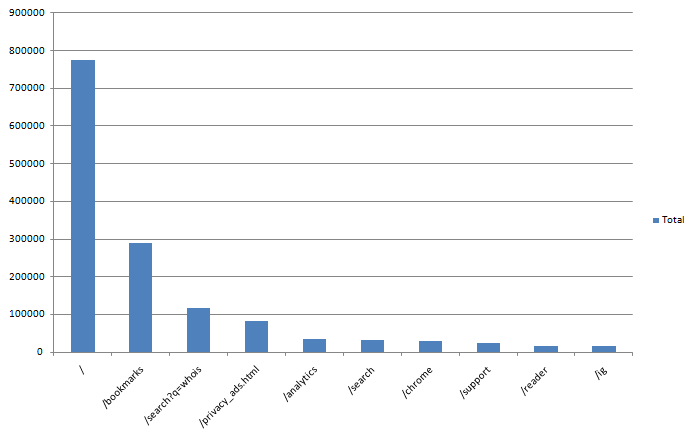
The top pages function of OSE is one of the most useful features ever. Ever since I saw the first incarnation in labs I've been a heavy user of this tool but Rich Baxter has taken things one step further yet again and given us a way to see the top linked to folders on a site. Here are the most linked to sub-folders and pages on www.google.com:

Get the step by step walkthrough to creating your own version of this over on seogadget.

Creating Geo Link Maps

Yes, I know that this involves a competitor. But the graphs are too super cool not to share! Take a look at the geomap of Distilled's backlinks:

Anyone would think we have a presence in the US or something! To learn how to make your own version of this go check out Wiep's wonderful article. You never know, one day this feature might be native to either OSE or Majestic.... I can but dream :-)

Pretty Tag clouds

Ok, we can probably file this one under "not management friendly" but you never know. If you do SEO for a dinosaur website....

These are the top anchor texts for SEOmoz visualised as a keywordasaurus. Hat tip to Dr Pete and SeanWF for this tool: http://www.tagxedo.com/app.html which let's you make the pretty pictures.

Visualising Directory Links

When quickly scanning a site's backlink profile there's a few different things that I look for more or less straight away. One of those is the split between quality links and umm non-quality links. It's not that the non-quality links don't work (depends how bad they are!) but the quality links are almost always the more interesting ones to analyse. These are the ones you really want to copy from your competitors. If you download an Open Site Explorer report into excel and then create a new column and paste the following formula in:

=IF(IFERROR(FIND("directory",A2),IFERROR(FIND("directory",B2),IFERROR(FIND("Directory",B2),0)))>0,"Y","N")

This formula is a little messy but basically just looks to see if either the URL or page title contains "directory". While this doesn't catch everything I've found that it get's you a long way there very easily. That will then let you create a nice little pie chart like this:

Venn Diagrams

Kelvin recently wrote a very interesting piece on creating venn diagrams between your links and competitor's links that looks a bit like this:

Kelvin has a nice handy video that walks you through how to create these charts (which I think are super management friendly!) over here.

Broken Links

I know this tool has been written about before and it's not technically a visualisation as such, more of a visual representation of your links but I love how quickly you can see which of your links no longer exist using Carter Cole's chrome extension "SEO site tools":

Of course, with yahoo site explorer not hanging around for much longer it's useful that this tool also works with Google Webmaster Tools:

I like this view, especially when I'm looking at a particular page as it gives me an indication of how many actual links might be pointing at the page and how many might have dropped off recently.

SEOmoz Labs

While this tool has been around for ages some of you might not know about it and especially some of you might not know how awesome this is for sales and non-technical people! Our sales team uses these kinds of charts all the time to quickly and easily get an overview comparison of a brand new website that they might be on the phone to:

Get your own one of these over in SEOmoz labs.

Article Resource : 7 Different Visualisations of Link Profiles